개발일기
유니티#13 NPC 구현 본문
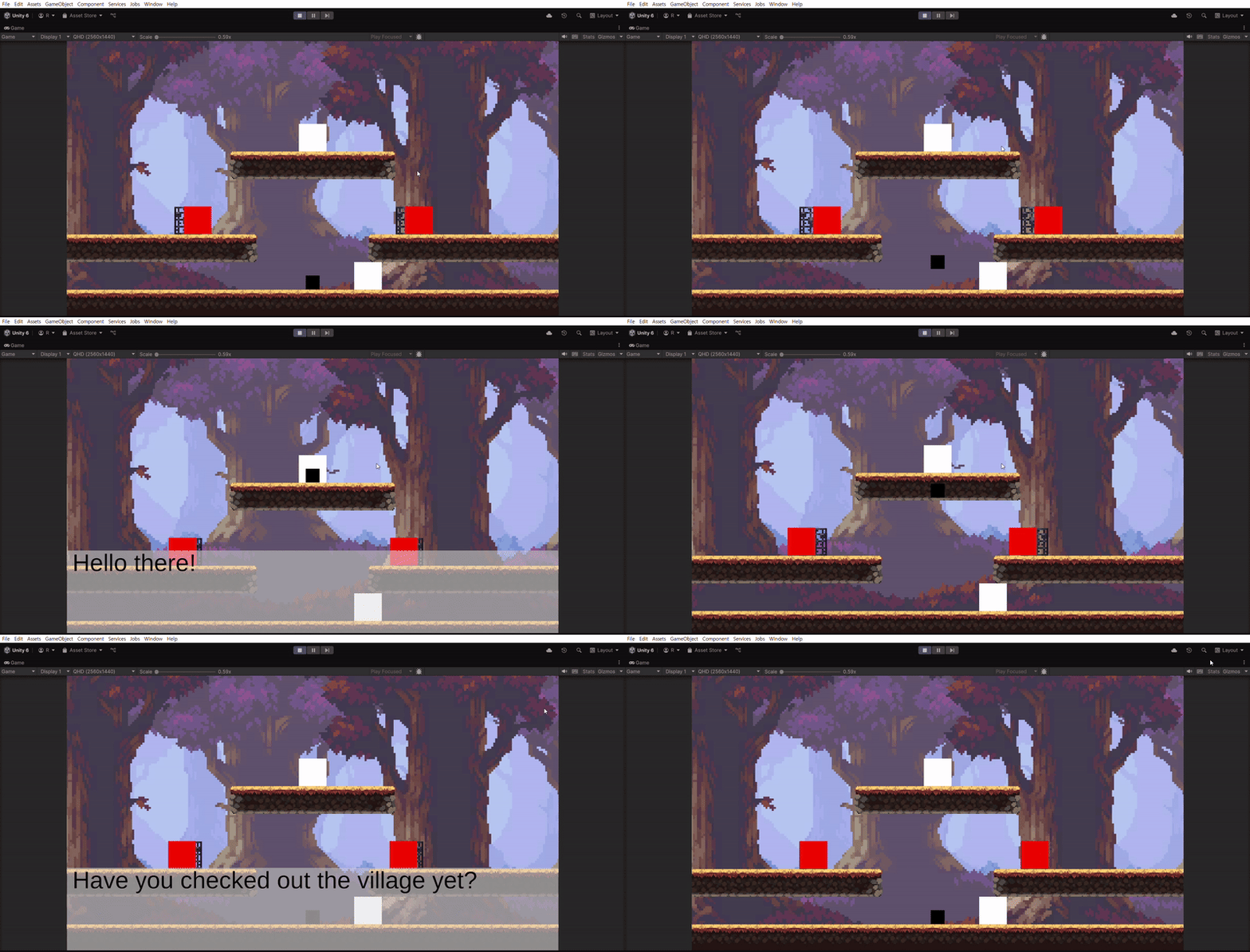
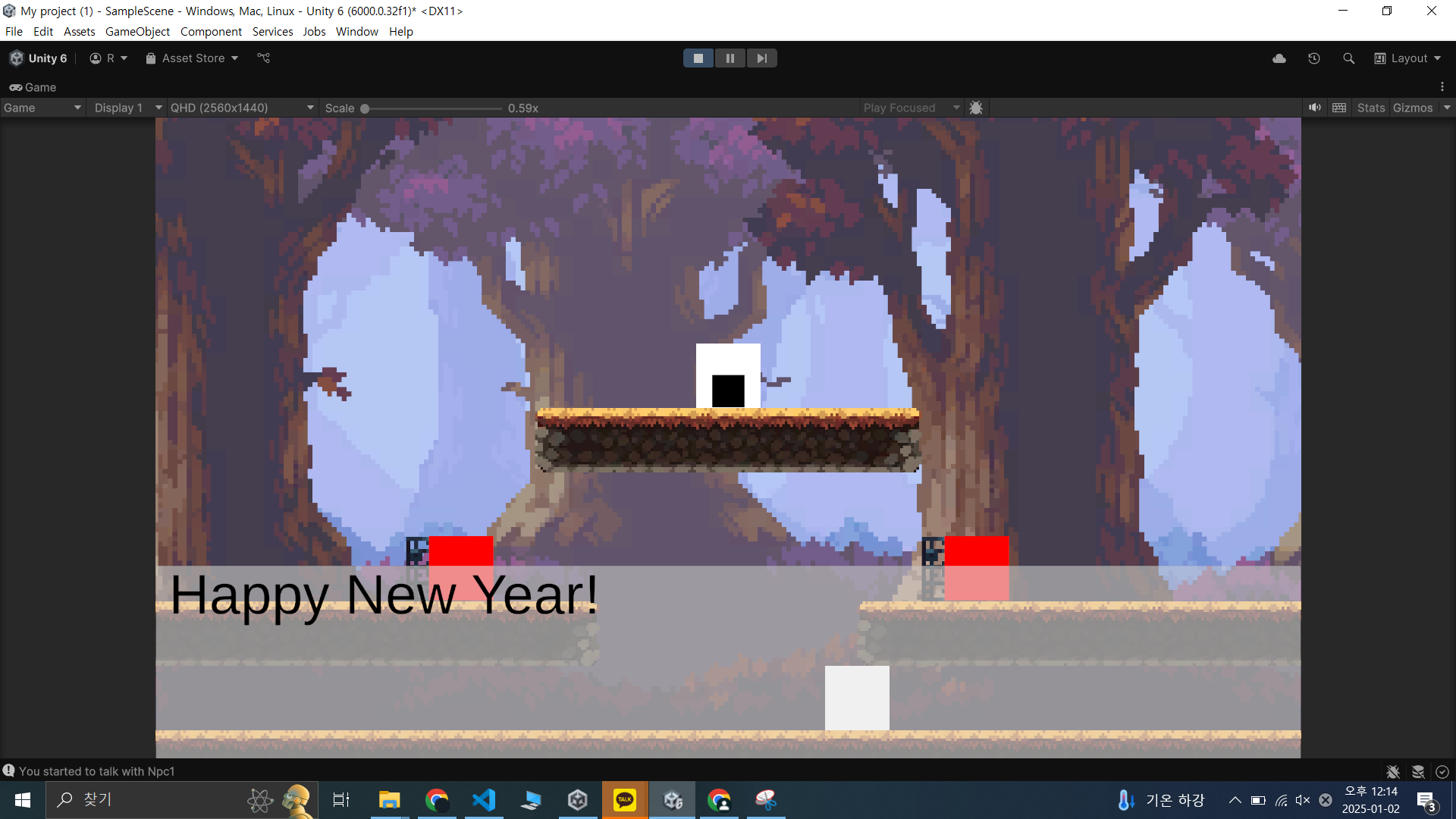
우선 NpcEmpty 오브젝트랑 Npc1 Npc2 오브젝트 생성하고 콜라이더 한사바리 넣어준다
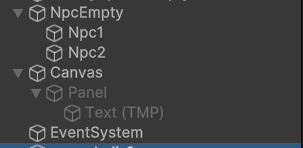
UI>Canvas도 생성해주고 그 자식 오브젝트로 Panel, 그 자식 오브젝트로 Text 넣어준다
이제 스크립트를 짜서 NpcEmpty한테 넣어준다
//NpcConversationHandler.cs
using UnityEngine;
using UnityEngine.UI;
using TMPro;
using System.Collections.Generic;

public class NpcConversationHandler : MonoBehaviour
{
    public KeyCode interactionKey=KeyCode.F;
    public GameObject conversationUI;
    public TMP_Text conversationText;
    public Dictionary<GameObject, string[]> conversationLines = new Dictionary<GameObject, string[]>();

    private int currentLineIndex=0;

    GameObject playerObject;
    PlayerMovement playerMovement;
    PlayerSkill playerSkill;
    GameObject activeNpc;

    bool isConversing=false;
    // Start is called once before the first execution of Update after the MonoBehaviour is created
    void Start()
    {
        playerObject=GameObject.FindWithTag("Player");
        playerMovement=playerObject.GetComponent<PlayerMovement>();
        playerSkill=playerObject.GetComponent<PlayerSkill>();
        isConversing=false;
        conversationUI.SetActive(false);
        currentLineIndex=0;
        InitializeConversations();
    }

    // Update is called once per frame
    void Update()
    {
        if (!isConversing)
        {
            StartConversation();
            return;
        }
        if (Input.GetKeyDown(KeyCode.Return)||Input.GetKeyDown(interactionKey)) {
            Debug.Log("go to the next text");
            currentLineIndex++;
            Debug.Log(currentLineIndex);
            if (currentLineIndex>=conversationLines[activeNpc].Length) {
                EndConversation();
                return;
            }
            conversationText.text=conversationLines[activeNpc][currentLineIndex];
        }
        if (Input.GetKeyDown(KeyCode.Escape)) {
            EndConversation();
        }
    }

    void StartConversation() {
        if (!Input.GetKeyDown(interactionKey)) {return;}

        Vector3 position=playerObject.transform.position;
        float radius=4.5f;
        LayerMask layerMask=1 << 9; // NpcLayer
        Collider2D[] nearbyNpcs=Physics2D.OverlapCircleAll(position, radius, layerMask);
        Debug.Log(nearbyNpcs);
        if (nearbyNpcs.Length>1) {
            activeNpc=FindClosestObject(playerObject.transform.position, nearbyNpcs);
        } else if (nearbyNpcs.Length==1) {
            activeNpc=nearbyNpcs[0].gameObject;
        } else {
            Debug.Log("No Npc around you!");
            return;
        }
        if (!conversationLines.ContainsKey(activeNpc))
        {
            Debug.Log($"No conversation lines found for {activeNpc.name}");
            return;
        }


        Debug.Log($"You started to talk with {activeNpc.name}");
        isConversing=true;
        playerMovement.canMove=false;
        playerSkill.canUseSkill=false;

        currentLineIndex=0;
        conversationText.text = conversationLines[activeNpc][0];
        conversationUI.SetActive(true);
    }

    void EndConversation() {
        isConversing=false;
        playerMovement.canMove=true;
        playerSkill.canUseSkill=true;
        Debug.Log($"You stopped talking with {activeNpc.name}");
        activeNpc=null;
        conversationUI.SetActive(false);
        currentLineIndex=0;
    }

    GameObject FindClosestObject(Vector3 origin, Collider2D[] colliders)
    {
        GameObject closestObject = null;
        float minDistance = Mathf.Infinity;

        foreach (var collider in colliders)
        {
            float distance = Vector3.Distance(origin, collider.transform.position); // 거리 계산
            if (distance < minDistance)
            {
                minDistance = distance;
                closestObject = collider.gameObject;
            }
        }

        return closestObject;
    }

    void InitializeConversations()
    {
        // Example: Populate npcConversationLines with NPCs and their conversations
        GameObject npc1 = GameObject.Find("Npc1");
        GameObject npc2 = GameObject.Find("Npc2");

        conversationLines.Add(npc1, new string[] {
            "Happy New Year!",
            "It's a beautiful day, isn't it?",
            "Goodbye!"
        });

        conversationLines.Add(npc2, new string[] {
            "Hi! I'm NPC 2.",
            "Have you checked out the village yet?",
            "See you around!"
        });
    }
}
코드가 잘 읽히지 않는다면 Start랑 Update부터 찬찬히 읽기
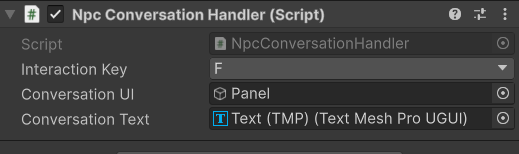
대화 작용 키는 F로 임의 설정해주고,
conversationUI에는 아까 만든 Panel을, conversationText에는 아까 만든 Text를 넣어준다.
Text 오브젝트가 타입이 나뉘는데, 그냥 Text도 있고 TMP_Text도 따로 있는 모양이다. 난 그냥 만들었는데 TMP길래 TMP로 바꿔줬다.
대화 시작 감지에는 전에 썼던 Overlap 썼다. Box랑 Circle이랑은 받는 인수가 다르니 조심하자.
참고로 전에 스킬에 Overlap 썼던건 지우고 그냥 Collider 썼다. 아니면 OnTrigger였던가.
FindClosestObject는 두 오브젝트 동시에 말 걸기를 방지하기 위해 넣어놨다.
ChatGPT가 써줬는데 갑자기 Infinity 나오길래 뭔가 싶었다, 코드 검토를 생활화 합시다...
playerMovement.canMove랑 playerSkill.canUseSkill은 대화하면서 헛짓거리 하지 말라고 추가해놨다.
대화 내용들은 원래 유니티 에디터에서 설정할 수 있게 하고 싶었는데, Dictionary는 설정이 안 되는 모양이었다.
Json이나 ScriptableObject로 쓰라는데, Json 활용 방법을 검토해놔야겠다...
이제 할 거
- 한글 폰트 적용
- 대화 뒤로 가기, 선택지 추가(아씨 이거 어케하지 머리아프네), 퀘스트 추가
- 인벤토리, 아이템 추가
- Enemy HP바 구현, UI 추가로 만들 거 다 설정
- 스킬 봉인, 해금 추가
'Unity' 카테고리의 다른 글
| 유니티#15 UI 활용 (1) | 2025.01.03 |
|---|---|
| 유니티#14 구조체와 리팩토링은 신이야 (0) | 2025.01.02 |
| 유니티#12 Hierarchy 정리, Tilemap 활용 (0) | 2025.01.01 |
| 유니티#11 Tilemap (0) | 2024.12.31 |
| 유니티#10 점프 로직 변경, switch문 (1) | 2024.12.30 |


